Technical SEO Audit
Fix Technical SEO Fast In One Workspace
Allable crawls your entire site, runs 200+ technical checks, and delivers a prioritized fix list in under 5 minutes. Every issue connects directly to your content and optimization workflow. No exports, no separate tools.
Hello! 👋
I'm your AllAble assistant. Fill in the highlighted fields below and hit send — I'll take it from there.
- 200+
- Technical checks per audit
- 100,000+
- Pages crawled per site
- <5 min
- Full audit turnaround
- One workspace
- From audit to fix
Most technical SEO tools find the problems and stop there.
Screaming Frog exports a spreadsheet you still have to interpret, prioritize, and act on in a completely separate workflow. Semrush Site Audit is comprehensive, but it sits behind a separate subscription tier and the fixes still happen somewhere else. Allable audits your site and connects every finding directly to the pages and tools where you make the changes.
What Allable Checks
200+ Technical Checks, Zero Guesswork
200+ Technical Checks
Allable crawls your site for broken links, redirect chains, missing meta tags, canonical errors, and more in a single pass. Every check is categorized as critical, warning, or pass so you always know what needs attention first. No configuration required to get started.
AI Fix Recommendations
For every issue flagged, Allable generates a specific, plain-language fix tied to that exact page. You get a clear action, not a raw error code you have to look up. Fixes connect to your on-page workflow so you can apply them without switching tabs.
Site Health Score
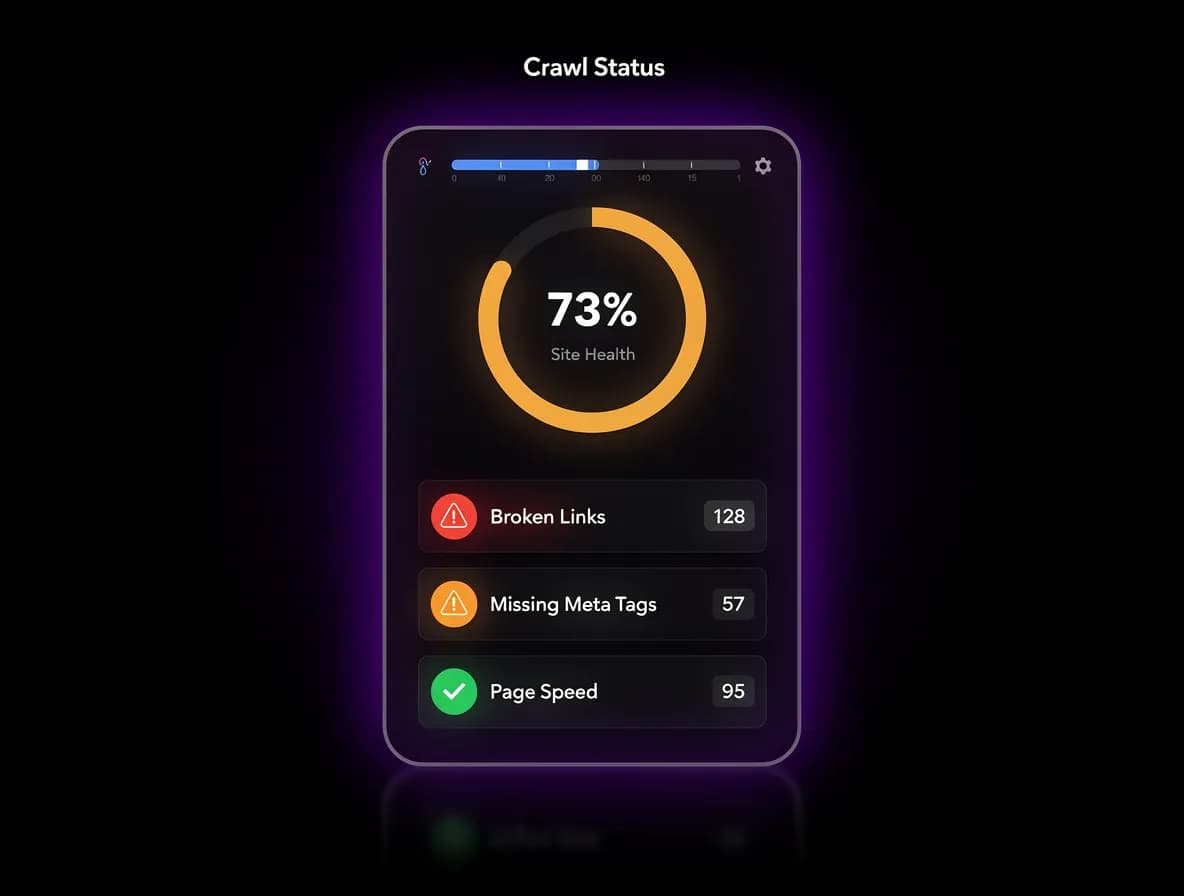
After every crawl, your site receives a 0–100 health score based on the severity and volume of issues found. The score tracks over time so you can see whether recent changes improved or hurt your technical standing. Scores below 60 trigger a priority alert.
Core Web Vitals Detection
Allable surfaces LCP, FID, and CLS issues automatically inside your audit report. Underperforming pages are flagged with the specific metric that is failing and why. From there, the fix recommendation connects directly to your on-page optimization workflow.
How it works
From Crawl to Fix Without Leaving Allable
Allable's technical audit runs inside the same workspace as your keyword research, on-page optimization, and content strategy. Your AI has full context from every marketing task you have run, so fix recommendations are grounded in your actual site and goals.
- Crawl up to 100,000 pages — results arrive in under 5 minutes.
- Prioritize by impact — critical issues are ranked by the traffic they put at risk.
- Fix in context — open any flagged page and apply the AI recommendation without switching tools.
Built For
One Audit Tool for Every SEO Team
SEO Manager
You run site audits every quarter and spend half the time organizing output into a format your team can actually act on. Your current stack exports CSVs that are stale before anyone reads them. Allable keeps every finding live, categorized, and connected to the pages that need fixing.
Marketing Manager
Technical SEO is not your primary skill set, but broken pages and slow load times are your problem to solve. You need a tool that tells you what is wrong and what to do about it, not one that hands you a 400-row spreadsheet. Allable translates every technical issue into a plain-language fix you can assign or apply yourself.
Agency SEO Lead
You manage audits across ten or more client sites and every one of them is on a different platform. Switching between Screaming Frog, Semrush, and a spreadsheet for each client costs you hours every week. Allable runs all your site audits in one workspace and generates client-ready findings from the same interface.
vs. alternatives
Why Teams Switch to Allable
| Feature | Allable | Screaming Frog | Semrush Site Audit | Ahrefs Site Audit |
|---|---|---|---|---|
| Pages crawled | Up to 100,000 | Unlimited (paid) | Up to 100,000 | Plan-dependent |
| Technical checks | 200+ checks | Core checks only | 130+ checks | Limited scope |
| AI fix recommendations | Yes, per-page | None | None | None |
| Site health score | 0–100 score | No score | 0–100 score | 0–100 score |
| Core Web Vitals | Detected + flagged | Basic detection | Full detection | Full detection |
| Fix inside the tool | Fix in workflow | Export only | External editor | External editor |
| Part of full marketing suite | All-in-one | Audit only | Add-on required | Add-on required |

Common Questions
Technical SEO Audit FAQ
What is a technical SEO audit?
A technical SEO audit is a systematic check of your website's infrastructure to find issues that prevent search engines from crawling, indexing, or ranking your pages. Common problems include broken links, missing meta tags, slow load times, and redirect errors. Fixing them directly improves your visibility in search results.
How long does an Allable technical SEO audit take?
Most sites get full audit results in under 5 minutes. Allable can crawl up to 100,000 pages per audit and returns categorized findings as soon as the crawl is complete. Larger sites may take slightly longer, but you do not need to configure anything to start.
How is Allable different from Screaming Frog?
Screaming Frog is a desktop crawler that exports raw data you still have to prioritize and act on manually. Allable runs in the browser, includes AI fix recommendations for every issue found, and connects the audit directly to your on-page optimization workflow. You do not need a separate tool to go from finding to fixing.
Can Allable fix technical issues automatically?
Allable does not rewrite your site's code or make server-level changes on your behalf. It generates a specific, plain-language fix recommendation for every issue, tied to the exact page where the problem exists. From there you apply the fix directly inside Allable's on-page editor or pass it to your developer.
What does the site health score measure?
The site health score is a 0–100 rating calculated from the number and severity of technical issues found in your latest crawl. Critical issues like broken pages and missing canonical tags carry more weight than warnings. The score updates after every crawl so you can track progress over time.
Is the technical SEO audit included in all Allable plans?
The technical SEO audit is available on all paid Allable plans starting at $49 per month. You can run your first audit immediately after signing up, with no additional configuration. Free trial users get access to a limited crawl to see results before committing.
Audit Your Site. Fix It Here.
Allable finds every technical issue on your site and connects the fix to your content and optimization workflow. No exports, no extra tools, no context switching.